
How to setup a home office
Hey there! Working from home has become the new norm, so having a kick-butt home office is a must. As the brains behind Veo Moves, I’m here to guide you through the process in a super easy and friendly way. No confusing jargon—just straightforward tips to make your workspace the envy of all your Zoom colleagues. Discover How to setup a home office.
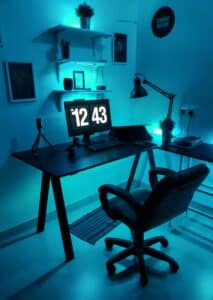
How to Set Up a Home Office: Your Easy and Friendly Guide by Veo Moves
1. Find Your Happy Spot
Let’s kick things off by choosing a designated work area. Pick a spot with minimal distractions—away from the hustle and bustle of your living room.
Picking the Perfect Work Desk
Now, about that desk. Go for one that matches your style and has enough space for all your stuff. It’s like creating a little work haven where you can boss it like a pro.
Create your own work haven by choosing a desk that’s both stylish and practical. Make sure it has enough room for all your cool gadgets and important papers.
2. Make Comfort Your BFF
Working long hours? Comfort is the name of the game. Get yourself an ergonomic chair and a desk that can be your height BFF.
Get Up and Stand!
Consider a desk that can go up and down. Yeah, it’s like magic! Standing desks are all the rage, and they’re awesome for your back and overall health.
Stay comfy with ergonomic furniture. Think chairs that feel like a hug and desks that can go up and down, giving you the flexibility to sit or stand like a boss.
3. Type Away in Style
Your keyboard and mouse are your trusty sidekicks. Choose ones that make typing feel like a breeze.
Ergo is the Way to Go
Go for keyboards and mice that love your hands. Wireless options? Even better! Move around like a ninja without getting tangled up.
Make typing a joy with keyboards and mice that feel amazing. Wireless options give you the freedom to roam around your workspace like a superhero.
4. Light Up Your Life
Let there be light! Good lighting is a game-changer, so let’s talk about finding that perfect balance.
Chase the Sun
Position your desk near a window for a dose of natural light. It’s like a mini-vacation for your eyes and mood.
Brighten up your workspace with natural light. Put your desk near a window for that feel-good vibe and save energy on artificial lights.
5. Look Good on the Screen
Video calls are the new normal. Time to upgrade your webcam and microphone game for that Hollywood look and sound.
Lights, Camera, Action!
Invest in a good webcam and microphone. Look and sound like a pro during those virtual meetings.
Level up your video call game with a top-notch webcam and microphone. Show off your professional side in every virtual meeting.

6. Organize Like a Pro
Keep the chaos at bay with nifty filing cabinets. Your documents will love their new home.
Storage Magic
Choose filing cabinets with loads of space. A clutter-free desk equals a happy and productive you.
Keep it organized with filing cabinets that are like magic for your papers. A tidy workspace equals less stress and more awesomeness.
7. Set It and Forget It
Think long-term. Invest in sustainable and durable office gear for a workspace that stands the test of time.
Go Green, Stay Clean
Choose furniture made from sustainable materials. It’s good for the planet and keeps your office looking fresh for ages.
Be a smart cookie by picking sustainable furniture. It’s a win for the environment and ensures your office setup lasts for the long haul.
8. Phone Calls and Chill
Create a cool spot for phone calls. Privacy is key, and you’ll thank yourself during those important conversations.
Call in Style
Set up a specific area for phone calls. No more interruptions—just you, your call, and a vibe of professionalism.
Stay professional with a designated phone area. It’s the secret sauce to smooth and disturbance-free phone calls.
9. Get Creative with Spaces
No mansion? No problem! Let’s get creative with your home office setup, no matter the size.
Space-Saving Hacks
Explore cool spots like alcoves or under stairs for your office. Move things around to make the most of your space without sacrificing style.
Turn any space into a home office wonderland with creative setups. Alcoves and under stairs? You’ve got options!
10. Let There Be Light (Overhead)
Apart from natural light, jazz up your office with some cool overhead lighting solutions.
Shine Bright, Shine Right
Think pendant lights or chandeliers for that extra wow factor. Illuminate your space with style.
Brighten up your workspace with overhead lighting that’s both stylish and functional. Pendant lights and chandeliers? Yes, please!
11. Plants for the Win
Bring a touch of nature into your home office with some greenery. Plants not only add aesthetic appeal but also improve air quality, creating a fresh and inspiring atmosphere.
Desk Buddies
Consider small potted plants for your desk, like succulents or a snake plant. They’re low-maintenance and bring a pop of colour to your workspace.
Liven up your home office with desk-friendly plants. Succulents or a trusty snake plant add a splash of colour without demanding too much of your attention.
12. Customizing Your Workspace
Personalize your home office to reflect your personality and motivation. Decorate the walls with inspiring quotes, artwork, or a vision board to keep you focused and motivated.
Wall of Inspiration
Create a feature wall with motivational quotes or images that resonate with you. It’s like your personal cheerleader, keeping you pumped throughout the workday.
Make your workspace uniquely yours by adding personal touches. A wall of inspiration with quotes and images will keep you motivated and ready to conquer any task.
13. Break It Up
Avoid burnout by incorporating designated break spaces within your home office. A cosy corner with a comfortable chair can be your go-to spot for quick breaks and relaxation.
Chill Corner
Set up a comfy chair or bean bag in a corner for short breaks. It’s the perfect spot to recharge and gather your thoughts before diving back into work.
Prevent burnout by creating a designated chill corner in your home office. A cosy chair or bean bag provides the ideal space for quick breaks and relaxation.
14. Personalized Lighting Options
Add a touch of warmth and personality with customizable lighting solutions. Desk lamps with adjustable brightness levels allow you to create the perfect ambience for different tasks.
Dim the Lights
Invest in a desk lamp with adjustable brightness settings. It not only enhances your workspace aesthetics but also lets you set the mood for focused work or a more relaxed atmosphere.
Infuse your home office with personality through personalized lighting. A desk lamp with adjustable brightness lets you control the vibe, creating the perfect ambience for any task.
15. Dual Monitor Setup for Productivity: How to setup a home office
Boost your productivity with a dual monitor setup. It provides a larger screen for real estate, making multitasking a breeze and improving overall efficiency.
Double the Screens
Consider adding a second monitor to your setup. It’s a game-changer for productivity, allowing you to have multiple applications open simultaneously without the hassle of constantly switching tabs.
Supercharge your productivity with a dual monitor setup. Two screens mean more space to juggle tasks, making multitasking a breeze and keeping you on top of your game.

16. Noise-Canceling Wonders: How to setup a home office
Block out distractions with noise-cancelling headphones. Whether it’s the neighbour’s lawnmower or household chatter, these headphones create a focused and serene work environment.
Silence is Golden
Invest in a good pair of noise-cancelling headphones. They’re your secret weapon against unwanted background noise, helping you maintain concentration and stay in the zone.
Escape distractions with the magic of noise-cancelling headphones. Block out background noise and create a serene work environment that enhances your focus and productivity.
17. Calendar Command Center: How to setup a home office
Keep your schedule in check with a dedicated calendar space. Whether it’s a physical planner or a digital calendar, having a visible reminder helps you stay organized and on top of deadlines.
Stay on Track
Set up a visible calendar space with your schedule and deadlines. It’s your command centre for staying organized and ensuring you never miss an important task.
Master your schedule with a calendar command centre in your home office. A visible reminder of your tasks and deadlines keeps you on track and in control.
18. Tech Support Essentials
Have a tech support kit within arm’s reach. This includes spare cables, chargers, and essential tech tools. Being prepared ensures you can troubleshoot quickly and minimize disruptions.
In a Nutshell: How to setup a home office
Creating your dream home office is all about mixing practicality with a touch of your unique style. Veo Moves is here to help you ace the remote work game. Follow these simple tips, and soon your home office will be the envy of everyone in your virtual meetings. Whether you’re working from home for a bit or making it a permanent thing, a little effort in setting up your space goes a long way. Happy working!